- Understand what a pull request is
- Identify how to create a pull request from one fork to another
- Identify how to add commits to an existing pull request
The concept of a pull request is unique to Github. It is a request for the owner of a receiving repository to take your changes, that you made on your own copy of the repo ("your fork"), and "pull" them into the owner's repository. Pull requests power the open source community. Through this process, anyone can fork a repo, make changes and submit a pull request. Instead of the owner working on their codebase alone, anyone can contribute: tests, documentation fixes, new features, awesome layout and graphics, etc...
There are some vocabulary words that we need to keep in mind in order to make sure that we're all on the same page.
- revision control system: a software program that keeps tracks of updates / deletions / additions / changes to a collection of content (usually a directory)
- "repository" (or "repo"): a directory of content (including subdirectories)
which is managed by
git(or, "under revision control") - "organization" (or "org"): a parent entity which "owns" a repo. This might
be an organization (IBM, Microsoft, the Python foundation) or it might be an
owning human (
sgharms). In the case of Learn.co labs, "orgs" arelearn-co-curriculumandlearn-co-students - "fork:" to make a copy of the repository owned by one org and add it
within another org.
sgharmsmight "fork"ruby/ruby(that isrubyorg'srubyrepo) to his own org. - "clone:" to copy a remote repo (on Github, typically, but this could be from a remote server, from a USB drive, even from another directory on your local system) to a local directory with the same name that's under git revision control
- "pull request:" to request that the owner of another org take changes you
made to your copy of the repo and integrate it into theirs as if you had
done the work on theirs directly. [Here][pr] is a great example of a pull
request on the
Rubycodebase.
Let's go over a conceptual example. It's OK if this feels a bit confusing at first, you'll work through this countless times and eventually your brain and fingers will both grasp what's going on.
- Suppose you "fork" a repo from
https://github.com/learn-co-students/awesome-lab. - You now have a copy of that repo on your Github account ("organization") i.e.
https://github.com/your-user-name/awesome-lab. Technologists would say you "forked" theawesome-labrepo from thelearn-co-studentsorganization to theyour-user-nameorganization. - But you still don't have a local copy of this repository on your computer. To do so you will...
- Clone from your fork to your computer. There's no reason you couldn't clone from the original repo. However, most repo owners don't want random people on the Internet (that's you!) committing to their repo. What you're going to do is establish a "parallel" repo in your org and then tell the "source" repo "Hey, I added something awesome, I'm requesting that you pull it in."
- Make some changes on your local machine
- Push your code from your local system back to your fork
- Create a pull request that requests your improved code be "pulled" into the source repo.
Here's a story:
- You fork the repository
https://github.com/learn-co-students/awesome-labtohttps://github.com/your-user-name/awesome-lab. - You make some changes to your newly forked repo.
- Another student forks the repository
https://github.com/learn-co-students/awesome-labashttps://github.com/their-user-name/awesome-lab. - You make some changes and you want to send a pull request to their fork
https://github.com/their-user-name/awesome-lab. How do you do this?
Amazingly, git doesn't care whether one repository is the "source" or is
"another fork of the source." Amazingly, if GitHub were to be wiped off the
earth tomorrow, local copies on hundreds of laptops 'round the world are just
as good as the copy that GitHub had! This is why git is called a
"Distributed Version Control System." So, to share a pull request with another
student follows the same process as forking some famous project (like Ruby or
jQuery).
Click on the New Pull Request button.
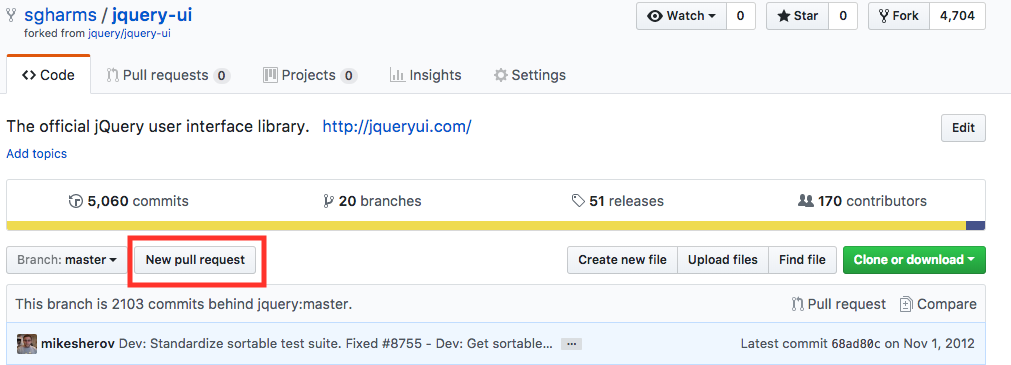
Here you can choose the base fork, which will be their-user-name/awesome-lab.
Then choose the head fork, which will be your-user-name/awesome-lab
Now click Create pull request.

Let's say you make a pull request from
https://github.com/your-user-name/awesome-lab to
https://github.com/learn-co-students/awesome-lab. Then you notice you made a
typo in your code. All you have to do is fix the typo, commit it and push up
the changes to your branch. As long as the pull request already exists, the
commits will be added automatically.
Please open a GitHub issue or pull-request. Provide a detailed description that explains the issue you have found or the change you are proposing. Then "@" mention your instructor on the issue or pull-request, and send them a link via Connect.
PHRG Github Pull Request Basics