

Deploy an app. Get a working HTTPS reverse proxy entry. Automatically. No manual DSM configuration. No certificate assignment. No cleanup to remember.
You have a Synology NAS acting as your home lab gateway. Every time you deploy a new service to Kubernetes, you open DSM, navigate to Application Portal → Reverse Proxy, fill in the hostname, the backend IP, the port, and assign a certificate. When a LoadBalancer IP changes, you update it manually. When you remove an app, you remember (or forget) to clean up the rule.
Synology Proxy Operator eliminates all of that. It watches your Kubernetes cluster and keeps your Synology DSM reverse proxy configuration in sync — automatically. Deploy an app, get a reverse proxy entry. Delete it, the rule is gone. Change the backend IP, the rule is updated. All without touching DSM.
On top of that, the operator:
- Assigns TLS certificates automatically — picks the best matching wildcard or SAN certificate from DSM, falls back to the default certificate
- Enforces access control — apply a Synology ACL profile (e.g. "LAN Only") globally or per-rule to restrict which clients can reach a service
- Supports additional hostnames — one app, multiple public FQDNs, each with its own DSM record and certificate
- Cleans up reliably — a Kubernetes finalizer ensures DSM records are removed before the rule object is deleted, even if the operator restarts mid-deletion
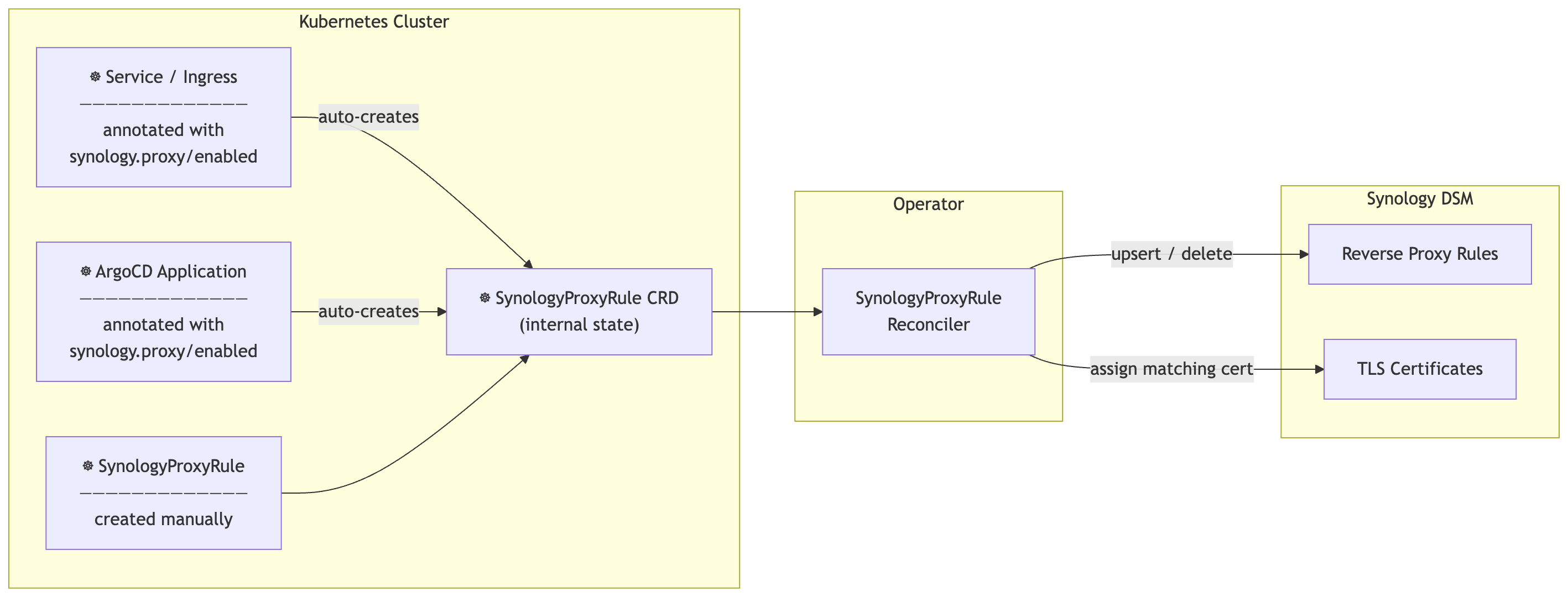
The operator runs three controllers:
| Controller | Watches | Action |
|---|---|---|
ServiceIngressReconciler |
Services + Ingresses with synology.proxy/enabled: "true" |
Creates / deletes SynologyProxyRule objects |
ArgoApplicationReconciler |
ArgoCD Application objects with synology.proxy/enabled: "true" |
Creates / deletes SynologyProxyRule objects |
SynologyProxyRuleReconciler |
All SynologyProxyRule objects |
Syncs to DSM — the only controller that calls the DSM API |
The first two controllers are purely Kubernetes-side. All DSM interaction flows through the third.
With operator.defaultDomain configured, the full lifecycle is hands-free:
- You deploy an app to Kubernetes
- The operator detects the new Service or ArgoCD Application
- A DSM reverse proxy rule is created for
myapp.home.example.com → <backend IP:port> - The best matching TLS certificate is automatically assigned
- If an ACL profile is configured, access restrictions are applied immediately
- When you delete the app, the DSM rule is removed automatically
If you run the Synology DNS Server package, it can automatically create A records for hostnames the reverse proxy manages. Combined with forwarding your internal DNS queries to the NAS, even DNS is zero-touch.
If you already use some DNS server like e.g. Pi-Hole you can set the upstream DNS to your NAS IP. This will provide an end-to-end workflow of provisioning new services to become available.
| Requirement | Version |
|---|---|
| Synology DSM | ≥ 7.0 (WebAPI access required) |
| Kubernetes | ≥ 1.28 |
| ArgoCD | ≥ 2.8 — optional, only for the ArgoCD watcher |
helm upgrade --install synology-proxy-operator \
  oci://ghcr.io/phoeluga/charts/synology-proxy-operator \
  --namespace synology-proxy-operator \
  --create-namespace \
  --set synology.url="https://192.168.1.x:5001" \
  --set synology.username="admin" \
  --set synology.password="secret" \
  --set synology.skipTLSVerify=true \
--set operator.defaultDomain="home.example.com"If you manage credentials externally (SealedSecret, External Secrets Operator, etc.):
helm upgrade --install synology-proxy-operator \
  oci://ghcr.io/phoeluga/charts/synology-proxy-operator \
  --namespace synology-proxy-operator \
  --create-namespace \
  --set synology.existingSecret=synology-credentials \
  --set operator.defaultDomain="home.example.com"
The Secret must have keys: SYNOLOGY_URL, SYNOLOGY_USER, SYNOLOGY_PASSWORD, SYNOLOGY_SKIP_TLS_VERIFY.
Use this when you want the latest fixes and features before a release, or when you need the CRD and chart to stay in sync with the operator binary automatically.
helm upgrade --install synology-proxy-operator \
  ./helm/synology-proxy-operator \
  --namespace synology-proxy-operator \
  --create-namespace \
  --set synology.existingSecret=synology-credentials \
  --set operator.defaultDomain="home.example.com" \
  --set image.tag=main \
  --set image.pullPolicy=Always
Or clone the repo and point Helm at the local chart directory.
The operator references credentials via synology.existingSecret. Create the Secret separately before ArgoCD syncs.
Step 1 — create the credentials Secret (once, outside ArgoCD):
kubectl create secret generic synology-credentials \
  --namespace synology-proxy-operator \
  --from-literal=SYNOLOGY_URL="https://192.168.1.x:5001" \
  --from-literal=SYNOLOGY_USER="admin" \
  --from-literal=SYNOLOGY_PASSWORD="secret" \
  --from-literal=SYNOLOGY_SKIP_TLS_VERIFY="false"
Step 2 — deploy with ArgoCD (stable GHCR release):
apiVersion: argoproj.io/v1alpha1
kind: Application
metadata:
  name: synology-proxy-operator
  namespace: argocd
spec:
  source:
    repoURL: ghcr.io/phoeluga/charts
    chart: synology-proxy-operator
    targetRevision: ">=0.0.0"
    helm:
      valuesObject:
        operator:
          defaultDomain: "home.example.com"
        synology:
          existingSecret: synology-credentials
  destination:
    server: https://kubernetes.default.svc
    namespace: synology-proxy-operator
  syncPolicy:
    automated:
      prune: true
      selfHeal: true
    syncOptions:
      - CreateNamespace=true
      - ServerSideApply=true
Alternative — track main branch directly (chart + CRD + binary always in sync):
  source:
    repoURL: 'https://github.com/phoeluga/synology-proxy-operator.git'
    targetRevision: main
    path: helm/synology-proxy-operator
    helm:
      valuesObject:
        operator:
          defaultDomain: "home.example.com"
        synology:
          existingSecret: synology-credentials
        image:
          tag: main
          pullPolicy: Always
ServerSideApply=trueis required for ArgoCD to upgrade CRDs on sync. Without it, CRD schema changes (e.g. new fields) are not applied onhelm upgradeor ArgoCD sync.
For a fully GitOps credential workflow, encrypt the Secret with Sealed Secrets or manage it via External Secrets Operator and commit only the encrypted/reference form to your cluster repo.
All settings are read from environment variables. Helm sets these automatically from values.yaml.
| Variable | Description | Default |
|---|---|---|
SYNOLOGY_URL |
DSM base URL — e.g. https://192.168.1.x:5001 |
required |
SYNOLOGY_USER |
DSM username | required |
SYNOLOGY_PASSWORD |
DSM password | required |
SYNOLOGY_SKIP_TLS_VERIFY |
Skip TLS verification (self-signed certs) | false |
DEFAULT_DOMAIN |
Domain appended to auto-derived hostnames, e.g. home.example.com |
"" |
DEFAULT_ACL_PROFILE |
Synology ACL profile name applied to all rules that do not specify one | "" |
RULE_NAMESPACE |
Namespace where auto-created SynologyProxyRule objects are placed. Empty = source app namespace |
"" |
ENABLE_ARGO_WATCHER |
Enable the ArgoCD Application watcher | true |
WATCH_NAMESPACE |
Namespace glob pattern (e.g. app-*) — Services, Ingresses and ArgoCD Applications in matching namespaces are auto-managed without needing the synology.proxy/enabled annotation. Empty = annotation-only mode. |
"" |
DISABLE_AUTO_DISCOVERY_IF_SPR_EXISTS |
When true, glob-based auto-discovery is suppressed for any namespace that already contains a manually-created SynologyProxyRule. Resources with synology.proxy/enabled: "true" are always managed regardless. |
false |
There are three ways to use the operator. Pick the one that fits your workflow.
Tip — skip annotations entirely: set
WATCH_NAMESPACEto a glob pattern (e.g.app-*) and every Service, Ingress, and ArgoCD Application in matching namespaces is managed automatically — no annotation required.
Fine-grained control within a glob-managed namespace:
- Set
synology.proxy/enabled: "false"on a resource to exclude it from auto-management, even when its namespace matches the glob.- Set
synology.proxy/auto-discovery: "false"on a Namespace to disable glob-based auto-management for the whole namespace. Individual resources in that namespace can still opt in withsynology.proxy/enabled: "true".- Enable
operator.disableAutoDiscoveryIfSPRExists: trueto have auto-discovery automatically back off for any namespace where you place a manualSynologyProxyRule.
The simplest approach: add one annotation to any existing Service or Ingress. The operator handles the rest.
apiVersion: v1
kind: Service
metadata:
  name: myapp
  namespace: myapp
  annotations:
    synology.proxy/enabled: "true"
    # Optional — omit if DEFAULT_DOMAIN is set; hostname becomes "myapp.home.example.com"
    synology.proxy/source-host: "myapp.home.example.com"
spec:
  type: LoadBalancer
  ports:
- port: 80apiVersion: networking.k8s.io/v1
kind: Ingress
metadata:
name: myapp
namespace: myapp
annotations:
synology.proxy/enabled: "true"
synology.proxy/destination-protocol: "https"
synology.proxy/acl-profile: "LAN Only"Removing the synology.proxy/enabled annotation — or deleting the object — removes the DSM record automatically.
Annotate the Application object. The operator discovers the backend from the application's destination namespace automatically.
apiVersion: argoproj.io/v1alpha1
kind: Application
metadata:
  name: myapp
  namespace: argocd
  annotations:
    synology.proxy/enabled: "true"
    # Optional — defaults to "myapp.home.example.com" when DEFAULT_DOMAIN is set
    synology.proxy/source-host: "myapp.home.example.com"
    # Optional — pin to a specific Service; otherwise auto-scans the namespace
    synology.proxy/service-ref: "myapp/myapp-svc"
    # Optional — restrict access using a Synology ACL profile
    synology.proxy/acl-profile: "LAN Only"
spec:
  destination:
    namespace: myapp
server: https://kubernetes.default.svcCreate a SynologyProxyRule directly for full control. Useful for services outside Kubernetes (VMs, NAS services, IoT devices).
Minimal — with DEFAULT_DOMAIN configured:
apiVersion: proxy.synology.io/v1alpha1
kind: SynologyProxyRule
metadata:
  name: myapp
  namespace: myapp
spec:
  serviceRef:
    name: myapp
    namespace: myapp
This creates a DSM record for myapp.home.example.com pointing at the LoadBalancer IP of the myapp Service.
Explicit — no auto-discovery:
apiVersion: proxy.synology.io/v1alpha1
kind: SynologyProxyRule
metadata:
  name: nas-photos
  namespace: synology-proxy-operator
spec:
  sourceHost: photos.home.example.com
  destinationHost: 192.168.1.100
  destinationPort: 8080
  destinationProtocol: http
  assignCertificate: true
  aclProfile: "LAN Only"
Multiple public hostnames for the same backend:
spec:
  sourceHost: myapp.home.example.com
  additionalSourceHosts:
    - myapp.example.org
  serviceRef:
    name: myapp
    namespace: myapp
Each hostname gets its own DSM record and certificate assignment.
When WATCH_NAMESPACE is set to a glob pattern, every resource in matching namespaces is managed automatically. Two annotations give you fine-grained control when you need it.
Set synology.proxy/enabled: "false" on the resource. This overrides the glob — the operator will skip it and clean up any existing DSM rule:
apiVersion: v1
kind: Service
metadata:
  name: internal-debug
  namespace: app-myapp     # matches WATCH_NAMESPACE=app-*
  annotations:
synology.proxy/enabled: "false" # excluded — no DSM rule createdAnnotate the Namespace itself. This stops the glob from matching any resource inside it:
kubectl annotate namespace app-dns synology.proxy/auto-discovery=falseResources in that namespace can still be managed individually with an explicit opt-in:
apiVersion: v1
kind: Service
metadata:
  name: dns-web
  namespace: app-dns
  annotations:
    synology.proxy/enabled: "true"   # opted in explicitly — rule is created
synology.proxy/source-host: "dns.home.example.com"Enable operator.disableAutoDiscoveryIfSPRExists: true (env: DISABLE_AUTO_DISCOVERY_IF_SPR_EXISTS=true) to let a manually-created SynologyProxyRule act as an implicit "hands-off" signal for its namespace.
When active, the operator detects any SPR in the namespace that it did not create itself (i.e. lacking the app.kubernetes.io/managed-by: synology-proxy-operator label). If one exists, glob-based auto-discovery is suppressed for that namespace and any previously auto-created rules are cleaned up:
# values.yaml
operator:
  watchNamespace: "app-*"
  disableAutoDiscoveryIfSPRExists: true
# Place the manual SPR in the APP's own namespace (not the centralised ruleNamespace).
# The operator checks the source namespace — so app-pihole's SPR suppresses only
# pihole auto-discovery, while app-homeassistant continues to be auto-managed.
apiVersion: proxy.synology.io/v1alpha1
kind: SynologyProxyRule
metadata:
name: pihole-custom
namespace: app-pihole # must be in the app's namespace, not synology-proxy-operator
spec:
sourceHost: pihole.home.example.com
serviceRef:
name: pihole
namespace: app-piholeResources with synology.proxy/enabled: "true" are always managed, regardless of this option.
For any resource the operator evaluates in this order:
synology.proxy/enabled: "false"on the resource → skip (always wins)synology.proxy/enabled: "true"on the resource → manage (always wins)- Namespace matches
WATCH_NAMESPACEglob and the namespace does not havesynology.proxy/auto-discovery: "false"and (DISABLE_AUTO_DISCOVERY_IF_SPR_EXISTSis false or no manual SPR exists) → manage - None of the above → skip
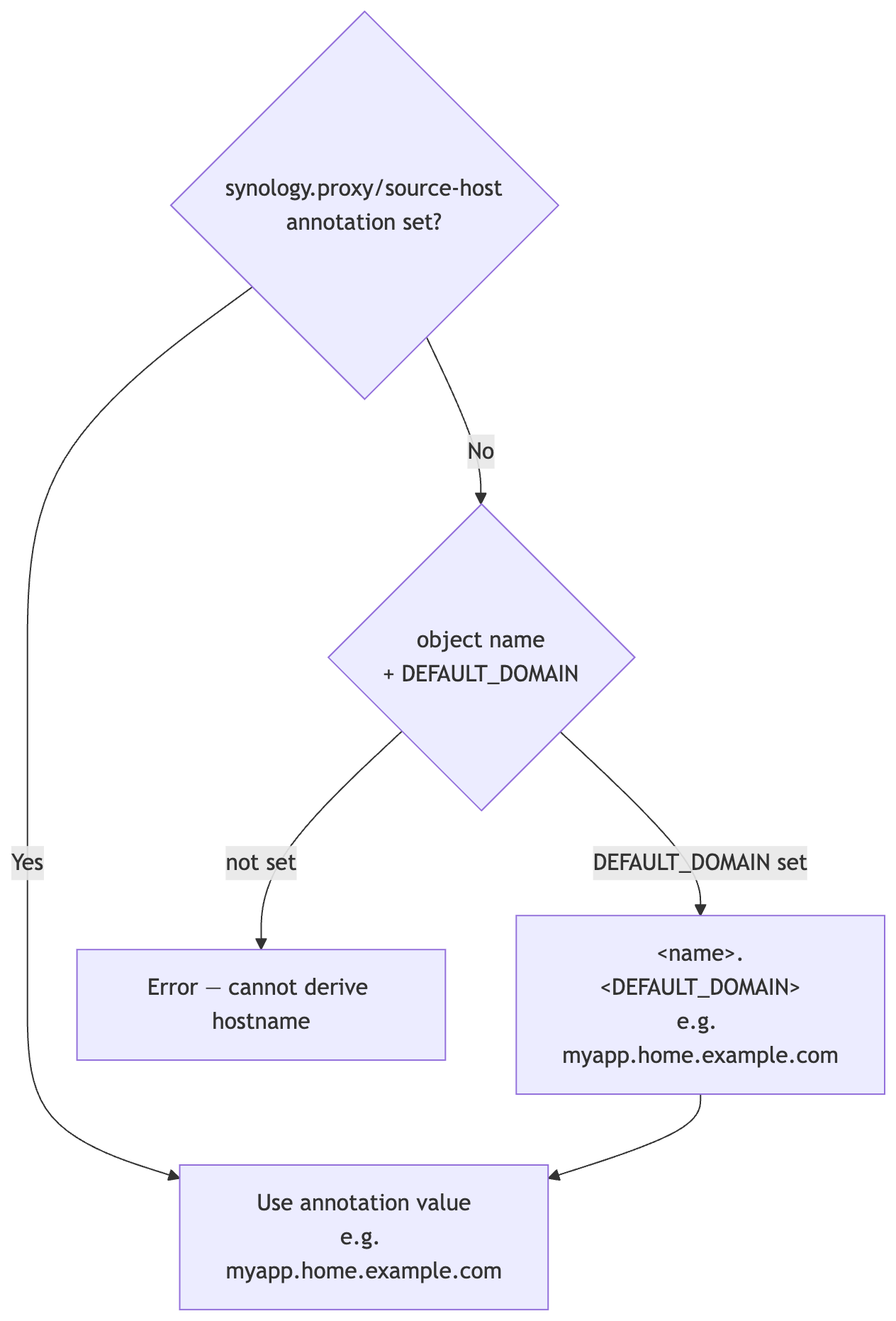
When spec.sourceHost is empty the operator derives it automatically:
| Mode | Name used for derivation |
|---|---|
| Service / Ingress annotation | Service or Ingress name |
| ArgoCD Application | Application name |
Manual SynologyProxyRule |
Rule name, or serviceRef/ingressRef name |
When spec.assignCertificate: true (the default), the operator assigns a TLS certificate to each DSM record after creation or update.
Selection order:
- Find a DSM certificate whose CN or SAN matches the source hostname — wildcard patterns like
*.home.example.comare supported - If no match is found, assign the DSM default certificate (
is_default: true)
Certificate assignment is only called when the proxy record was just created or updated, not on every reconcile loop.
Synology DSM supports Access Control Profiles that restrict which source IPs or networks can reach a reverse proxy rule. The operator integrates this at two levels:
- Global default — set
operator.defaultACLProfile(Helm) orDEFAULT_ACL_PROFILE(env) to apply a profile to every rule that does not specify one - Per-rule — set
synology.proxy/acl-profileannotation on a Service, Ingress, or ArgoCD Application, or setspec.aclProfileon aSynologyProxyRuledirectly
Profile names are resolved to DSM UUIDs automatically and cached for 5 minutes to reduce API calls.
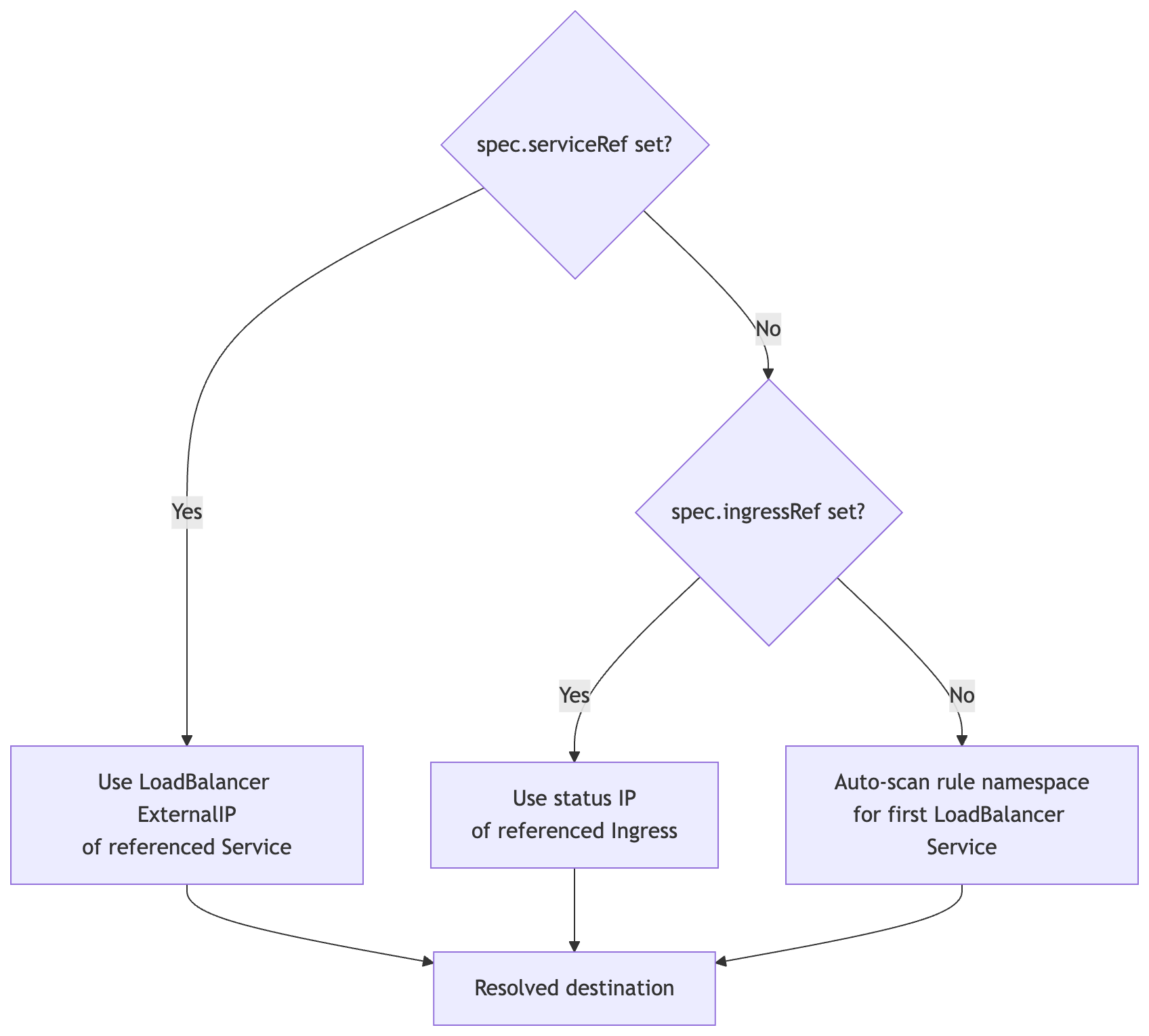
When destinationHost / destinationPort are not set:
| Annotation | Applies to | Description | Default |
|---|---|---|---|
synology.proxy/enabled |
Service, Ingress, ArgoCD App | "true" opts in; "false" explicitly opts out (overrides WATCH_NAMESPACE glob) |
— |
synology.proxy/auto-discovery |
Namespace | "false" disables glob-based auto-management for all resources in this namespace; explicit synology.proxy/enabled: "true" on individual resources still works |
"true" |
synology.proxy/source-host |
Service, Ingress, ArgoCD App | Public FQDN override | derived from name + domain |
synology.proxy/acl-profile |
Service, Ingress, ArgoCD App | Synology ACL profile name | DEFAULT_ACL_PROFILE |
synology.proxy/destination-protocol |
Service, Ingress, ArgoCD App | Backend protocol: http or https |
http |
synology.proxy/assign-certificate |
Service, Ingress, ArgoCD App | Set "false" to skip TLS cert assignment |
"true" |
synology.proxy/service-ref |
ArgoCD App | <namespace>/<name> — Service for backend discovery |
auto-scan |
synology.proxy/ingress-ref |
ArgoCD App | <namespace>/<name> — Ingress for backend discovery |
auto-scan |
synology.proxy/destination-host |
ArgoCD App | Backend IP/hostname override | auto-discovered |
synology.proxy/destination-port |
ArgoCD App | Backend port override | auto-discovered |
apiVersion: proxy.synology.io/v1alpha1
kind: SynologyProxyRule
metadata:
  name: myapp
  namespace: myapp
spec:
  # ── Frontend ───────────────────────────────────────────────────────────────
  sourceHost: myapp.home.example.com     # optional when DEFAULT_DOMAIN is set
  additionalSourceHosts:                 # each gets its own DSM record
    - myapp.example.org
  sourcePort: 443                        # default: 443

  # ── Backend ────────────────────────────────────────────────────────────────
  destinationHost: ""                    # auto-discovered when empty
  destinationPort: 0                     # auto-discovered when 0
  destinationProtocol: http              # http (default) | https

  # ── Backend auto-discovery ─────────────────────────────────────────────────
  serviceRef:
    name: myapp
    namespace: myapp                     # defaults to rule namespace when omitted
  ingressRef:
    name: myapp-ingress
    namespace: myapp

  # ── DSM settings ───────────────────────────────────────────────────────────
  aclProfile: "LAN Only"                 # DSM Access Control profile name
  assignCertificate: true                # auto-assign matching TLS certificate

  customHeaders:                         # defaults to WebSocket upgrade headers
    - name: Upgrade
      value: $http_upgrade
    - name: Connection
      value: $connection_upgrade

  timeouts:
    connect: 60                          # seconds
    read: 60
    send: 60

  # ── Internal (set automatically) ───────────────────────────────────────────
  description: ""                        # DSM record label — defaults to namespace/name
managedByApp: "" # set by ArgoCD watcher, do not set manuallykubectl get spr -ANAMESPACE NAME SOURCE HOST DESTINATION SYNCED RECORDS AGE
myapp myapp--myapp myapp.home.example.com 192.168.1.55 true 1 12m
nas nas-photos photos.home.example.com 192.168.1.100 true 1 3d
kubectl describe spr myapp -n myapp| Status field | Description |
|---|---|
status.synced |
true when the last DSM sync succeeded |
status.managedRecords |
All DSM records owned by this rule (one per source hostname) |
status.managedRecords[].uuid |
DSM record UUID |
status.managedRecords[].sourceHost |
Frontend hostname for this record |
status.resolvedDestinationHost |
Backend IP/hostname that was discovered |
status.resolvedDestinationPort |
Backend port that was discovered |
status.lastSyncTime |
Timestamp of last successful sync |
status.conditions[Synced] |
Standard Kubernetes condition |
status.conditions[Ready] |
true when backend is discovered and rule is active |
Force re-sync:
kubectl annotate spr myapp -n myapp force-sync="$(date +%s)" --overwrite| Value | Description | Default |
|---|---|---|
synology.url |
DSM base URL | required |
synology.username |
DSM username | required |
synology.password |
DSM password | required |
synology.skipTLSVerify |
Skip TLS certificate check | false |
synology.existingSecret |
Name of an existing Secret with DSM credentials | "" |
operator.defaultDomain |
Domain suffix for auto-derived hostnames | "" |
operator.defaultACLProfile |
ACL profile applied when none is specified per rule | "" |
operator.enableArgoWatcher |
Enable ArgoCD Application watcher | true |
operator.watchNamespace |
Namespace glob (e.g. app-*) for annotation-free auto-management |
"" |
operator.ruleNamespace |
Namespace for auto-created SynologyProxyRule objects. Empty = source app namespace |
"" |
operator.disableAutoDiscoveryIfSPRExists |
Suppress glob auto-discovery for any namespace that already contains a manually-created SynologyProxyRule |
false |
installCRDs |
Install CRDs via Helm | true |
leaderElection |
Enable leader election for HA deployments | false |
| Document | Description |
|---|---|
| Architecture | Internal design, reconciler flow, project structure |
Apache 2.0 — see LICENSE.