


A Lovelace card that embeds the Windy.com interactive weather map and spot forecast directly into your Home Assistant dashboard.
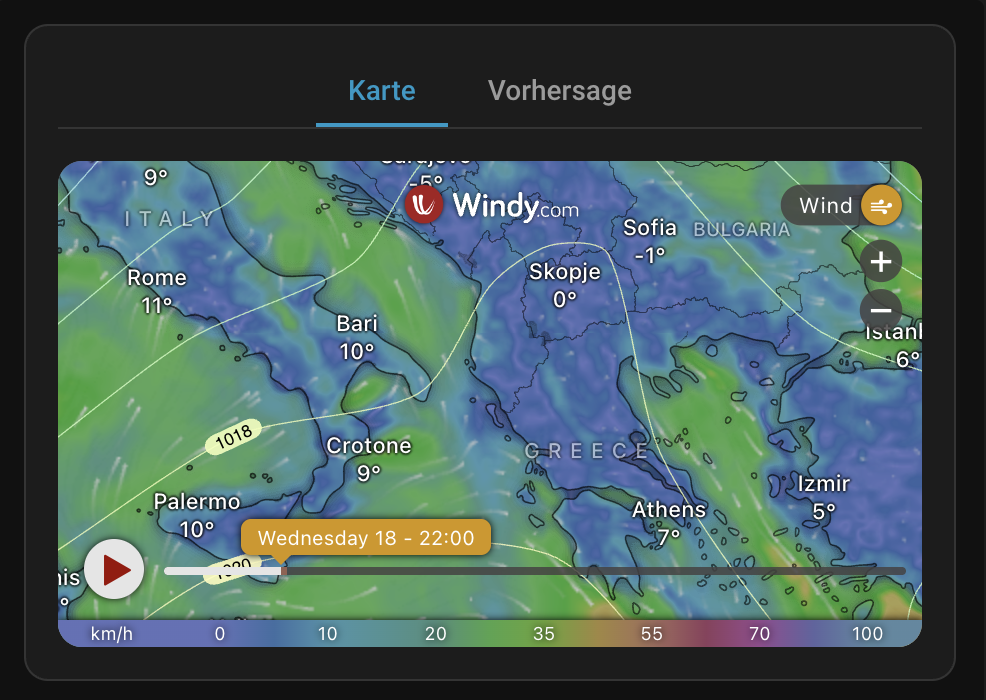
- Interactive Windy Map with 50+ weather layers (wind, rain, temperature, radar, satellite, air quality, and more)
- Map Reset Button to quickly re-center and reset zoom without reloading the dashboard
- Spot Forecast view for a detailed point forecast at any location
- Zone entity support — point the map at any HA zone automatically
- Marker & Spot detail — pin a specific lat/lon for the marker and spot forecast popup
- Conditional editor — elevation and forecast model selectors only appear for compatible layers; map layers and display options are hidden when in
forecast_onlymode. - Accessibility — Full keyboard navigation support (arrows, Home, End) for the mode switcher tabs.
- Reliability — Extensive test suite covering card logic, URL generation, and the configuration editor.
- Pressure isolines toggle (disabled automatically for radar/satellite)
- Aspect ratio or fixed pixel height for flexible layout. Maintains map and forecast dimensions seamlessly without layout shifts.
- Fully translated — English, French, and German
- English
- French
- German
Contributing Translations
- Fork the repository on GitHub.
- Copy
src/translation/en.jsonand rename it to your language code (e.g.es.json). - Translate all values.
- Submit a pull request.
This card is available in the Home Assistant Community Store (HACS).

Manual Installation
- Download
windy-card.jsfrom the latest release. - Place it in your
config/wwwdirectory. - Add the resource under
Settings→Dashboards→...→Resources:- URL:
/local/windy-card.js - Resource Type:
JavaScript Module
- URL:
The card is fully configurable through the Lovelace UI editor. Options are organized into collapsible sections.
| Name | Type | Default | Description |
|---|---|---|---|
type |
string | Required | custom:windy-card |
title |
string | — | Card title |
default_mode |
string | map |
map, forecast, map_only (no toggle), or forecast_only |
| Name | Type | Default | Description |
|---|---|---|---|
location |
string | — | HA zone or device_tracker entity to use as map center (overrides lat/lon) |
latitude |
number | HA location | Map center latitude |
longitude |
number | HA location | Map center longitude |
| Name | Type | Default | Description |
|---|---|---|---|
overlay_entity |
string | — | HA entity whose state is used as the map overlay (overrides overlay) |
overlay |
string | wind |
Weather layer (see full list below) |
level |
string | surface |
Altitude level (only for compatible layers) |
product |
string | ecmwf |
Forecast model (hidden for radar/satellite) |
zoom |
number | 5 |
Zoom level (3–11) |
| Name | Type | Default | Description |
|---|---|---|---|
forecast_product |
string | ecmwf |
Data provider for the spot forecast widget (e.g., AROME, ICON-D2) |
| Name | Type | Default | Description |
|---|---|---|---|
aspect_ratio |
string | 16:9 |
Responsive ratio (16:9, 4:3, 3:2, 1:1, 2:1). Set to empty to use fixed height. |
height |
number | 450 |
Fixed height in px (used when aspect_ratio is empty) |
no_padding |
boolean | false |
Remove padding and border from ha-card (applies to all modes) |
| Name | Type | Default | Description |
|---|---|---|---|
metric_temp |
string | default |
Temperature unit: default, °C, °F |
metric_rain |
string | default |
Rain unit: default, mm, in |
metric_wind |
string | default |
Wind unit: default, kt, m/s, km/h, mph, bft |
| Name | Type | Default | Description |
|---|---|---|---|
show_marker |
boolean | false |
Show a pin at the detail location |
show_spot |
boolean | false |
Show the spot forecast popup |
show_pressure |
boolean | false |
Overlay pressure isolines (not available for radar/satellite) |
hide_message |
boolean | false |
Hide the Windy promotional message |
Core: wind, rain, temp, clouds, waves, raincum, gusts, windcum, cat, icing, radar, satellite
Atmosphere: snow, snowdepth, ptype, thunder, dewpoint, rh, freezing, wetbulb, fog, cloudtop, cloudbase, visibility, cap, thermals, hclouds, mclouds, lclouds
Solar & UV: solarpower, uv
Ocean: swell, swell2, swell3, wwave, sst, currents, tidalcurrents
Air Quality: no2, pm25, aerosol, ozone, so2, surfaceozone, co, dust
Other: pressure, extreme, warnings, drought, fire
This card uses the free Windy Embed Widget, which has strict functional limitations compared to the full Windy.com website or app:
- Premium Login: The embed widget does not support user authentication or token passing. Premium features, such as 1-hour forecast steps, are only available on the main Windy app.
- Radar Units Support: The radar overlay natively displays intensity in
dBZ(unlike the full app'smm/htoggle). This is the intended behavior of the Windy Embed API. Unit settings configured on this card (metric_rain, etc.) serve as your preferred defaults for the spot forecast and other compatible overlays. - Satellite Spectrum: Although Windy provides Blue, Visible, and Infrared satellite options, the embed iframe automatically strips or ignores external URL overrides (like
satelliteMode=IRBT) and forces the default view. Toggling these maps must be done manually using the controls within the iframe.
type: custom:windy-card
title: Local Weather
overlay: wind
zoom: 7
aspect_ratio: '16:9'type: custom:windy-card
title: Mountain Forecast
latitude: 47.421
longitude: 10.985
show_spot: true
overlay: wind
level: 850h
zoom: 8type: custom:windy-card
title: Home Area
location: zone.home
overlay: rain
zoom: 6
aspect_ratio: '4:3'type: custom:windy-card
title: Air Quality
overlay: pm25
zoom: 5
metric_wind: km/h
hide_message: trueSetup
-
Clone the repository:
git clone https://github.com/timmaurice/lovelace-windy-card.git cd lovelace-windy-card -
Install dependencies:
npm install
-
Start the watch server:
npm run watch
-
Point your HA Lovelace resource to
dist/windy-card.js.
For issues or feature requests, visit the GitHub repository.

