Overleaf with Jabref
Overleaf is an online LaTex editor which makes collaborative scientific writing much easier. With overleaf, researchers, publishers, and personal interested in writing papers can solely focus on the content of their paper as formatting and styling are handled by overleaf for them. Its usability and ability to increase the speed and efficiency of research writing has successfully turned Overleaf into one of the most useful tools for students, researchers, writers in school, university, and research institutes.
Overleaf was launched in 2012 as WriteLatex by John Hammersley and John Lees-Miller to create a better solution for writing scientific publication, collaboration, and communication. Ever since it has only grown and now supports over six million users worldwide.
Some Key features of Overleaf
- Open source, free and online
- for collaborative scientific writing
- Anyone even with no knowledge of latex can use overleaf
- About 1 million templates of scientific documents are available in overleaf
While Overleaf is a tool for us to excel in authoring scientific papers, Jabref can be considered as our reference manager. A crucial part of writing papers is managing the reference from resources we have cited and borrowed the ideas from. Citing papers can also be very time consuming and sometimes difficult and this is where Jabref comes in handy.
Jabref is an open-sourced software for discovering, collecting, and organizing, and citing research literature in an efficient mechanism. Overleaf together with Jabref can be considered as the art of state for scientific writing and collaborations
Getting started with overleaf with Jabref
- For setting up Jabref one must simply install it to their device from its official site (https://www.jabref.org/).
-
The main user interface of Jabref contains a Menu bar, Icon bar, Sidebar
-
In the menu bar under the files we select ”New library” to create a library that will save all the information on the reference we have collected for our paper.g)
-
To add a new entry we click on the icon with ”+”.
-
It opens the "Entry Editor" opens and we can create a new entry by filling up the information.
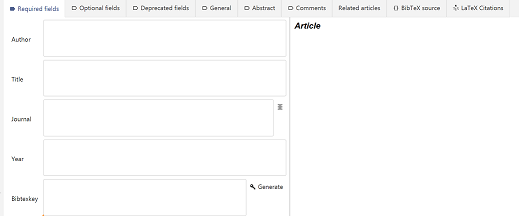
- Information such as "Author","Title","Journal" and "Year" can be manually filled.
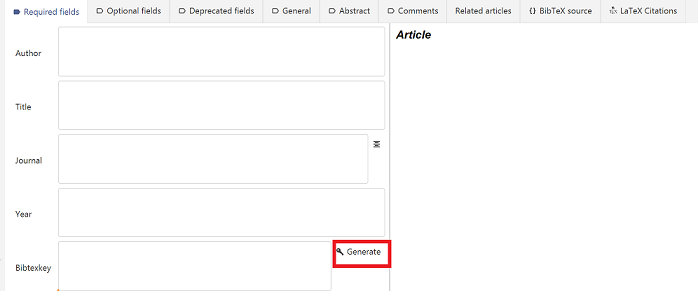
- "citationkey" is one of the required fields that allows referencing inside the documentation by using the stored information in our library. It can be generated by clicking on the "generate" button.
OR,
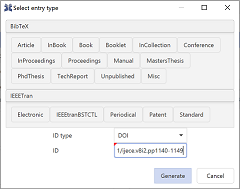
- To add a new entry we click on the icon next to ”+”.
- We can simply copy the DOI of the research paper we want to cite.

- we can Select DOI in Id type and paste the copied DOI in the ID field and all the information is automatically fetched and previewed on the entry editor and save the library.
-
Upload the library in the overleaf where the project is being loaded. The Library will have**.bib **extension
-
Use command bibliography{Library_name.bib} to load the list of reference we had saved using Jabref.
-
Use command cite{citationkey} to cite the paper.
-
After entering the information the reference is saved and we can preview the information on the right side of the entry editor